Have you downloaded or copied order data from Mergado Orders and are trying to make sense of it?
We believe that most of you will find the statistics easy to understand, but just in case you don’t, here’s a guide to understanding the individual elements.
As you probably know, Mergado Orders currently allows you to download orders from Eshop-Rychle on three levels:
- by customer, or rather by their email address
- by products sold
- by days (time period)
For all types of exports, the user can choose the time period for which the data should be downloaded - 7, 30, 90, 180, or 360 days.
Mergado Sources generates data as a CSV file. We have already shown you how to get it into Google Sheets or Looker Studio here.
Now let’s take a look at how to read the statistics. Orders are sorted into columns by individual elements.
What elements do we work with and how do we understand them?
1. Table of orders by customer email
In this type of export, we see statistics about orders by customer email. We can see, for example, their delivery address, what goods they purchased, how many items, and their value.

Explanation of individual elements:
EMAIL – the email address to which the order was created
VAT_ID – VAT number, if the customer was a taxable entity
BILLING_CITY – billing address (city)
BILLING_COUNTRY – billing address (country)
SHIPPING_CITY – delivery address (city)
SHIPPING_COUNTRY – delivery address (country)
CONVERSIONS_ITEMS – purchased goods, separated by commas (if there are more than one)
CONVERSIONS_VALUE_VAT – total order value (including VAT)
CONVERSIONS_VALUE – order value (excluding VAT)
CONVERSIONS_QUANTITY – number of products purchased
2. Table of orders by product
This export shows sales statistics for individual products. We can see how many items of which products were sold during the selected period and their values.
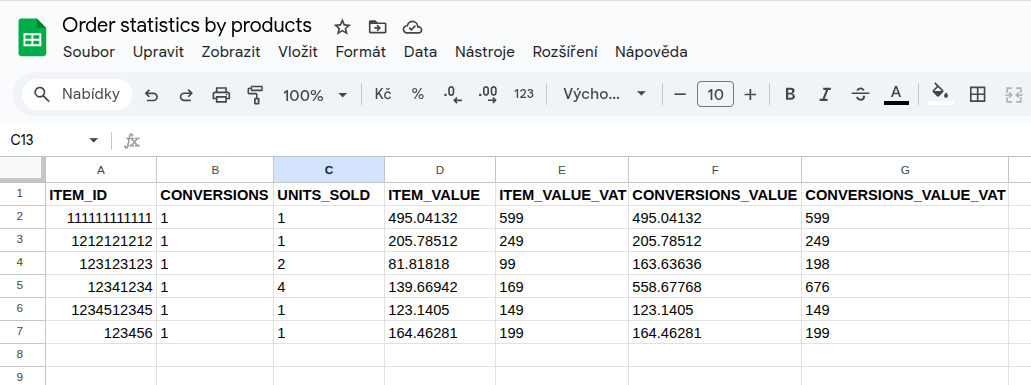
Explanation of individual elements:
ITEM_ID – product ID from the e-shop
CONVERSIONS – number of orders
UNITS_SOLD – number of units sold
ITEM_VALUE – product price (excluding VAT)
ITEM_VALUE_VAT – product price (including VAT)
CONVERSIONS_VALUE – value of the entire order (excluding VAT)
CONVERSIONS_VALUE_VAT – value of the entire order (including VAT)
3. Table of orders by time period
The last export type shows all orders for an “x” time period (you can choose from 7, 30, 90, 180, and 360 days). We can see how many items were sold on each day and their values.
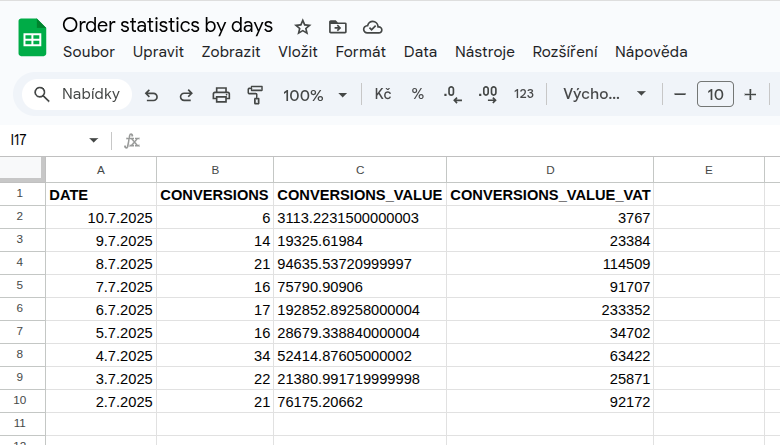
Explanation of individual elements:
DATE – date of order creation
CONVERSIONS – number of orders for a given day
CONVERSIONS_VALUE – total value of all orders (excluding VAT)
CONVERSIONS_VALUE_VAT – total value of all orders (including VAT)
We hope you enjoy working with the application! 